

School fee management software. Less chasing. More clarity.
Zibma’s school fee management software brings fee planning, payments, receipts, and reporting into one connected school ERP. It gives your office clearer records, management better visibility, and parents a simpler, more convenient payment experience.
Product view
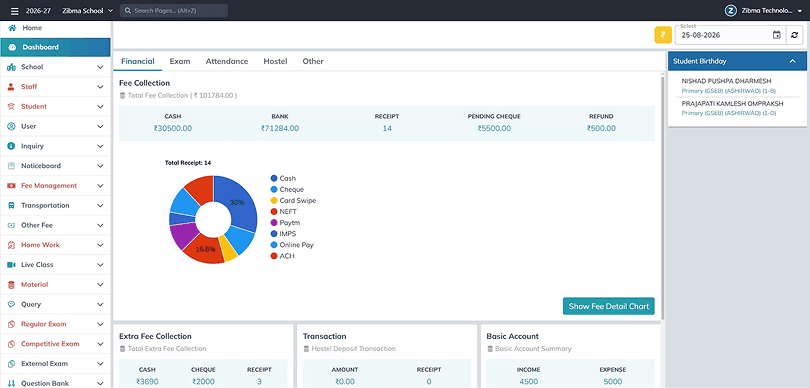
- Fee collection
- Receipts
- Financial overview
- Explore this module
- Schools sharing their experience with Zibma





What is school fee management software?
School fee management software is a system that defines student charges, records payments, tracks outstanding balances, and produces receipts and reports. Zibma brings these functions into Campus ERP, connecting finance with the rest of your institution.
For every person behind a payment.
A shared fee record gives the office a student balance, the accountant a payment trail, and management a collection overview. Parents can find dues and receipts without depending on a separate office lookup.
When fee records are scattered, fee collection work keeps coming back.
School collections involve more than receiving money. Small gaps between records turn into repeated checks, delayed answers, and avoidable follow-up.
Repeated fee follow-up
Due dates, partial payments, and exceptions become harder to track when reminders depend on individual staff members.
Too many versions of a balance
Separate counter entries, bank records, and spreadsheets leave the accounts team checking which amount is current.
The same parent questions
Families call for fee breakdowns and receipts when they cannot find a clear record themselves.
Key features of Zibma's school fee management software.
Fee software needs to handle everyday collections and the exceptions. Build your workflow around the policies, approvals, and records your institution actually uses.
Flexible fee structures
Organize tuition, term, and admission fees by class, program, campus, or academic year. Effective dates and prorated fees accommodate mid-term admissions and withdrawals.
Installments & concessions
Set installment schedules and record approved scholarships, sibling concessions, and waivers. Keep the reason for an adjustment connected to the student’s payable amount.
Bills & branded receipts
Generate recurring or one-time bills and consistent payment receipts. Review numbering, fee breakdowns, and required receipt details before applying a structure across your school.
Reminders & due dates
Schedule automatic reminders before and after each due date. Late fees and fines are set up separately in the Extra Fees module.
Refunds & adjustments
Record credits, advances, reversals, and refund approvals with a financial trail. Retain the reason for changes when students transfer, withdraw, or receive an approved concession.
Staff access & approvals
Assign permissions to cashiers, accountants, auditors, and administrators. Separate routine collection work from sensitive changes, and test your approval scenarios before assigning staff access.
Role-based fee access for every team.
Each person needs a different view of the same fee activity. Keep responsibilities clear without making families repeat their questions across departments.
Fee office
Find balances, record collections, and answer routine receipt questions with the student’s fee record in view.
Accounts team
Review settlements, adjustments, and exports without losing the connection between a payment and its source.
Management
See collections and outstanding fees across the institution, then focus attention where a review is needed.

- Clear fee breakdowns
- Accessible receipts
How do parents pay through the online fee collection system?
Parents pay through Zibma's online fee collection system using UPI, cards, net banking, or wallets via integrated gateways. The office can also record cash, cheque, and demand draft payments. Every payment updates the student's fee record and issues a receipt.
A clearer view of what is due.
The parent portal and mobile app bring fee breakdowns, payment options, statements, and receipts into reach. Families can understand what they owe and what has already been paid before contacting the office.
See your school’s fee process in action.
Explore billing, parent payments, and reporting in one focused demo.
Which fee reports can your team review?
Zibma's school fee management software includes dashboards, aging analysis, reconciliation, and Excel or PDF exports. Review collections, outstanding balances, and settlement status in one place.
-
01
Daily collections
Review amounts received, payment methods, and settlement status.
-
02
Outstanding fees
Focus follow-up by class, campus, program, or age.
-
03
Financial review
Examine adjustments, waiver impact, and reconciliation differences.
A focused view for fee follow-up
Sample report
Illustrative report · sample data
₹12,00,000
Manual fee collection or school fee management software?
Compare the work your office needs to complete. A connected ERP brings fee structures, student records, parent payments, receipts, and staff access into one streamlined process.
|
Your task
|
Disconnected fee processes
|
Connected fee workflow
|
|---|---|---|
|
Fee changes
|
Update fee details across different systems and verify records manually.
|
Apply fee changes directly to connected student records.
|
|
Parent questions
|
Check balances, payment status, and receipts before responding.
|
Give parents direct access to dues, payment status, and receipts.
|
|
Collections review
|
Check payment records from different sources and reconcile them manually.
|
View collection and payment information together in one place.
|
|
Receipt management
|
Generate, share, and track receipts through separate steps.
|
Generate and access receipts directly from the fee record.
|
|
Pending fees
|
Identify outstanding dues through separate reports or follow-ups.
|
Track pending and overdue fees with connected student records.
|
|
Staff access
|
Share information across staff and manage access separately.
|
Assign role-based permissions and keep activity within the system.
|
|
Fee reports
|
Collect data from different sources before preparing reports.
|
Generate fee reports from centralized, up-to-date records.
|
Connected to the rest of your campus.
Admission dates, transport routes, and hostel categories can affect a student’s fees. Zibma connects fee administration with these campus processes and communication tools. Confirm which modules and data connections are included in your proposed setup.
Fee data security and approval controls.
Fee records need defined responsibilities. Review role permissions, approval steps, and audit trails with your team. Ask separately about hosting, backups, retention, and payment handling before agreeing on your requirements.
- Role-based access
- Approval controls
- Activity records
Your school fee management software questions, answered.
Can schools collect fees online and at the counter?
Yes. Zibma’s online fee collection system accepts UPI, cards, net banking, and wallets through integrated gateways, and the office can record cash, cheque, and demand draft payments. Every payment updates the student’s balance.
Can campuses have different fee policies?
Yes. Zibma supports campus-specific fee structures and multi-branch controls. You decide which policies, concessions, receipt numbering, and reports are shared and which vary by campus.
Does it support installments and scholarships?
Yes. You can set installment schedules and record scholarships, concessions, and waivers. Each approved adjustment is saved with its reason and appears in parent statements and accounts reports.
Can we migrate our existing fee records?
Yes. The Zibma team reviews your file formats and opening balances before import. Spreadsheets or exports from another vendor usually need some preparation first.
Will it replace our accounting software?
Not necessarily. Ledger mapping, reconciliation, and exports support fee accounting. For broader bookkeeping, see Zibma’s Basic Accounts module and check with your accountant which integrations you need.
Is school fee data secure in Zibma?
Zibma protects fee data with role-based access, approval controls, and activity records. Ask about hosting, backups, retention, payment handling, and support so you have written answers before you decide.
See Zibma's school fee management software in one focused demo.
Bring your actual fee structure and the questions your office handles every week. See billing, a parent payment, and reconciliation in one focused demonstration.